Windows
Official release / Version 1.0.1
- Target
- Windows
- File name
- ChartPlaybackDataTool-Windows-v1.0.1.zip
- File size
- 39,848,536 bytes
- SHA-256
DCDF8DBF8B438A4414AC81105FD78DF501732FDE80DAD01008745C3C620B195B
Price-data tool
A free desktop tool for saving price data in CSV format.
It is a related tool that helps prepare price CSV files for Chart Playback. Windows v1.0.1 is an official release; macOS builds are unnotarized evaluation builds.
You can use it without using Chart Playback. No account registration or sign-in is required.
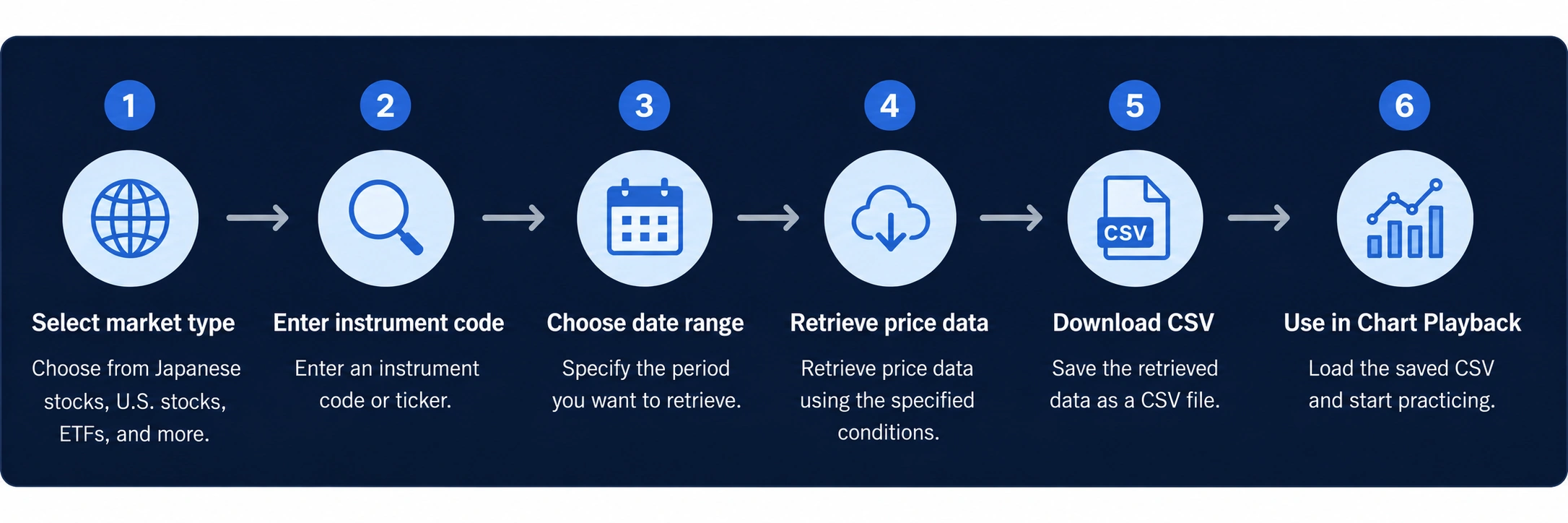
An example flow from creating a CSV with Data Tool to loading it in Chart Playback with a free member account.
Select the image to open the original image.
It does not provide bulk retrieval of multiple instruments, cloud storage, or sync across devices.
It supports retrieval of Japanese stocks, U.S. stocks, crypto assets, futures and indexes, and foreign exchange data.
Data may not be available depending on the instrument or financial product, status of the data source, or specification changes.
Chart Playback Data Tool is a related tool that helps prepare price CSV files used with Chart Playback.
The Chart Playback web app does not directly retrieve price data from the internet. CSV files saved with Data Tool can be loaded with Chart Playback free-member features.
Data Tool is separate from the Chart Playback web app and can also be used on its own.
It retrieves price data over the internet based on the instrument code or ticker and date range entered.
It does not use account registration or cloud storage. You choose where CSV files are saved.
The accuracy, completeness, and continuing availability of retrieved data are not assured. Check dates, prices, missing values, and similar details yourself before use.
Data Tool does not direct investment decisions, forecast future price movements, or assure profits.
It is for non-commercial, non-business use by individuals for themselves. You are responsible for your own investment decisions.
Choose the distribution file that matches your operating system or CPU.
Official release / Version 1.0.1
DCDF8DBF8B438A4414AC81105FD78DF501732FDE80DAD01008745C3C620B195BUnnotarized evaluation build / Version 1.0.1
89514D895F4304CD5C7BD16016C87306C69A758A2BB788AD7F28666AB5F30826Unnotarized evaluation build / Version 1.0.1
99EF9E66AF0908721CAC19A68A3DB88712C2C126BEEF704AF1D752AA6500D923The macOS builds are unnotarized evaluation builds without Apple Developer ID signing or Apple notarization. A macOS warning may be shown on first launch.
Choose the Apple Silicon build for Apple Silicon Macs and the Intel build for Intel processor Macs. Testing is limited to some environments, and operation is not assured on every Mac or macOS version.
Please review the Chart Playback Data Tool Terms before use. Agreement to the Terms is required on the app's first launch.
Related information
Review the Data Tool options, price-data guidance, and contact information.